
One self-hosted QA tool for visual, Figma, and accessibility checks: Truframe

A test report that says "something changed" and stops there doesn't help much. Every QA team has opened one and thought: fine, but does it matter?
A visual diff, the tool that compares two versions of a page, can spot that they look different. It can't tell you if that difference is a real bug, an intended edit, or just noise. Someone still has to sit there and work it out. On a big site, that's a lot of time lost.
Truframe is a self-hosted website QA tool, built by Specbee for our own client projects. It does that sorting for you, and it's honest about where it stops being sure and hands the call back to you.
Key Takeaways
- Truframe is a self-hosted website QA tool from Specbee. It helps your team decide which visual changes matter, instead of reviewing every difference by hand.
- It checks four things: visual regression, design conformance against Figma, WCAG 2.2 A and AA accessibility, and site health.
- Each page runs through five ordered layers, from screenshots to an AI vision verdict. Only the hard cases reach the AI model.
- AI gives a verdict with a reason. A person accepts the change, logs a defect, or raises a bug in ClickUp.
- Blocked sites get reported as blocked. Accessibility results spell out what still needs a human.
What is Truframe?
Truframe is a self-hosted website quality platform. It has a web app for day-to-day work and a command-line tool that fits into CI.
You add a project, point it at an environment such as production or staging, and choose which pages to test. From there it covers four areas:
- Visual regression: screenshots compared against approved baselines.
- Design conformance: how closely a build matches its Figma design.
- Accessibility: automated WCAG 2.2 A and AA checks, plus a clear record of what still needs a human.
- Site health: SEO audit, broken links, and content checks.
QA engineers, developers, and project managers all see the same results in one place. That replaces the usual three tabs and three tools.
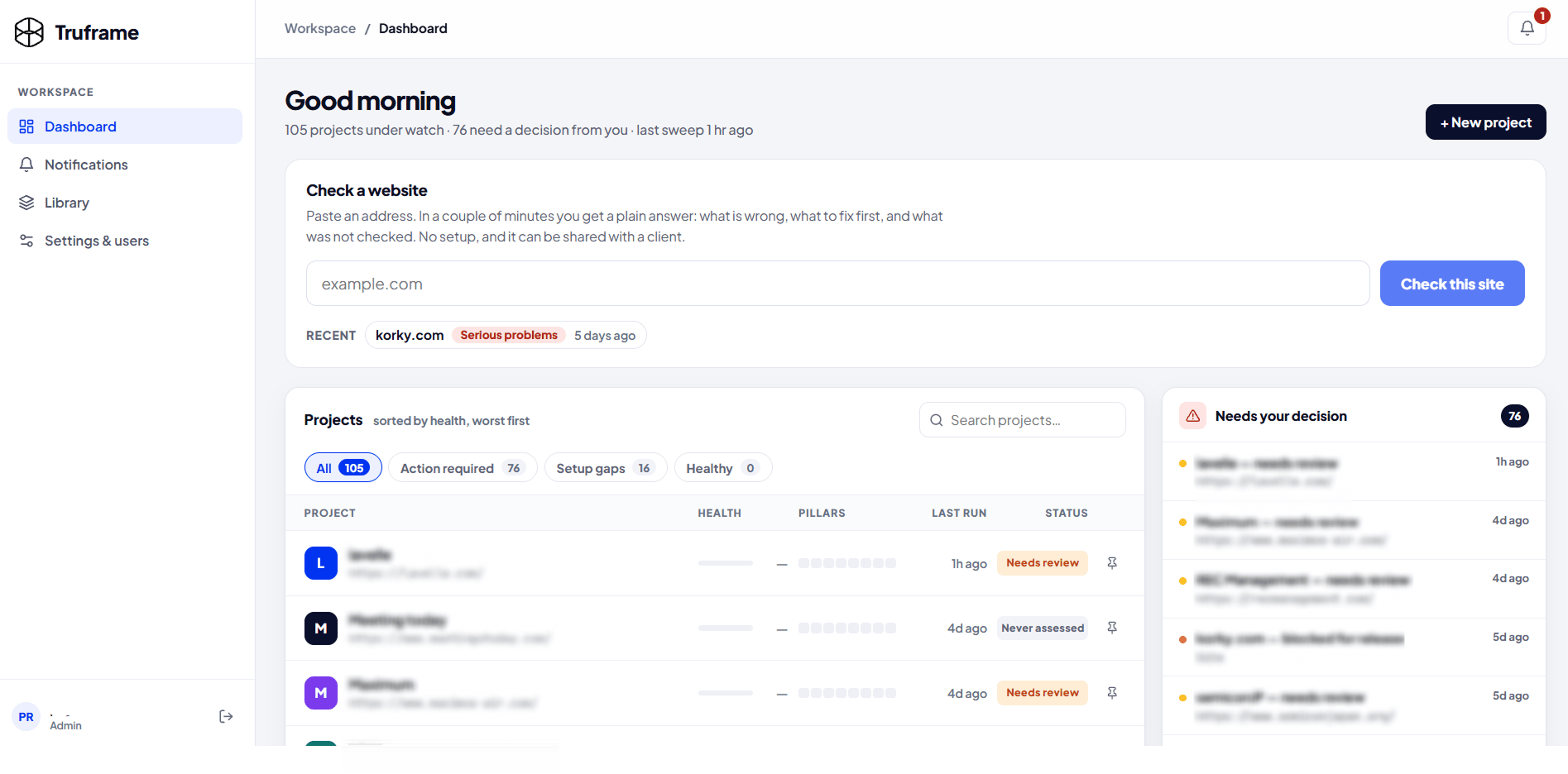
How does Truframe decide whether a visual change matters?
Truframe runs the cheap checks first and escalates only when it has to. Most differences get resolved before any AI model is involved.
Each page passes through up to five layers, in order:
- Screenshots. Playwright captures each page at desktop, tablet, and mobile sizes. Animations are frozen. Elements that change on every load, like admin toolbars and status messages, get masked.
- Perceptual hash. A quick similarity score. Pages that clearly haven't changed stop here.
- Pixel diff. If a page looks different, Truframe maps the changed regions.
- Rules. A rule-based pass sorts the change into layout, content, style, or noise.
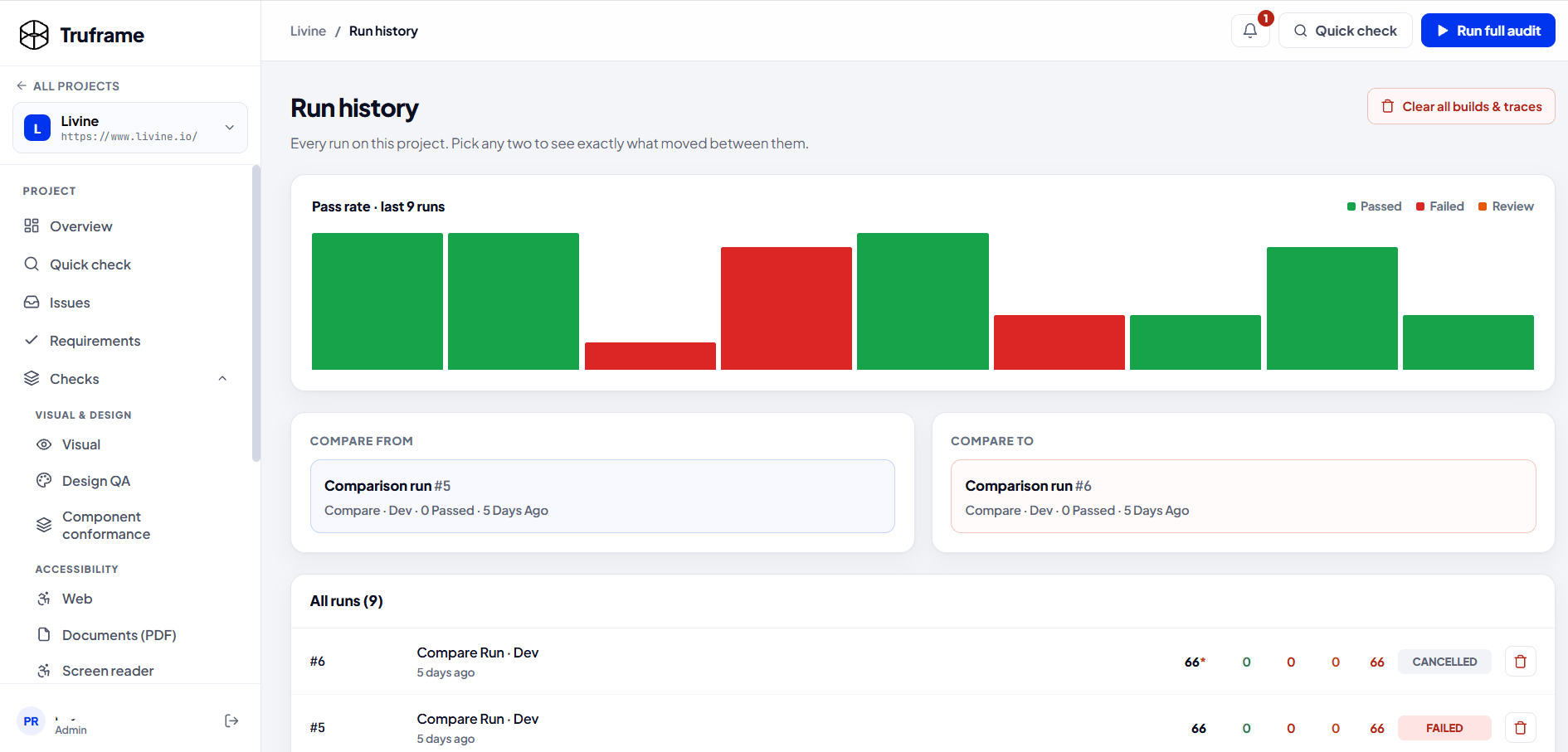
- AI vision. For what's left, Claude or a local Ollama model gives a verdict: noise, an intended change, or a likely bug. Each verdict comes with a plain-language reason.
The point of the layers is cost. The expensive AI check only runs on changes the cheaper layers couldn't settle.
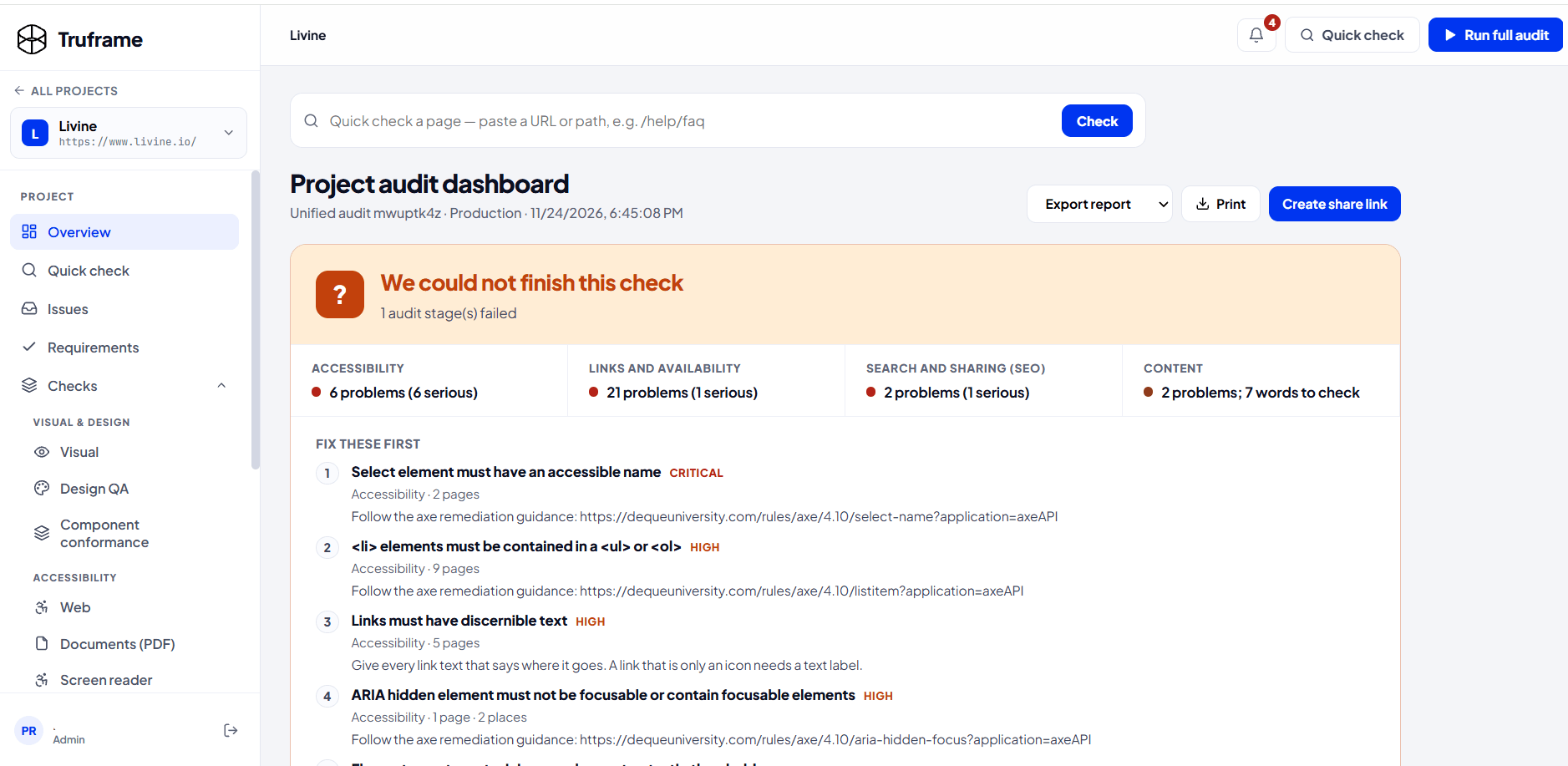
Who makes the final call on a flagged change?
A person does. The AI verdict is advice.
Each result can be viewed side by side, as an overlay, an onion skin, or a slider. From there, someone on your team accepts the change, logs a defect, or raises a bug in ClickUp.
A model can be wrong, so the decision stays with the team.
How do you run your first check?
Getting a project set up takes five steps:
- Add a project and point it at an environment, such as production or staging.
- Pick the pages you want to test.
- Run a first scan to capture baselines.
- Approve the baselines that look right.
- Run again after any change. Truframe compares against the approved baselines and flags what moved.
From there, every run is a comparison against work you already signed off on.
How do you check whether a build matches its Figma design?
That question usually gets answered by someone squinting at two browser tabs. Truframe gives it a proper home.
It reads your Storybook and lists every story, grouped by component. For each story, you link the matching Figma frame, and Truframe reports how closely the build matches it. The summary shows how many stories are linked, how many match, and how many drift.
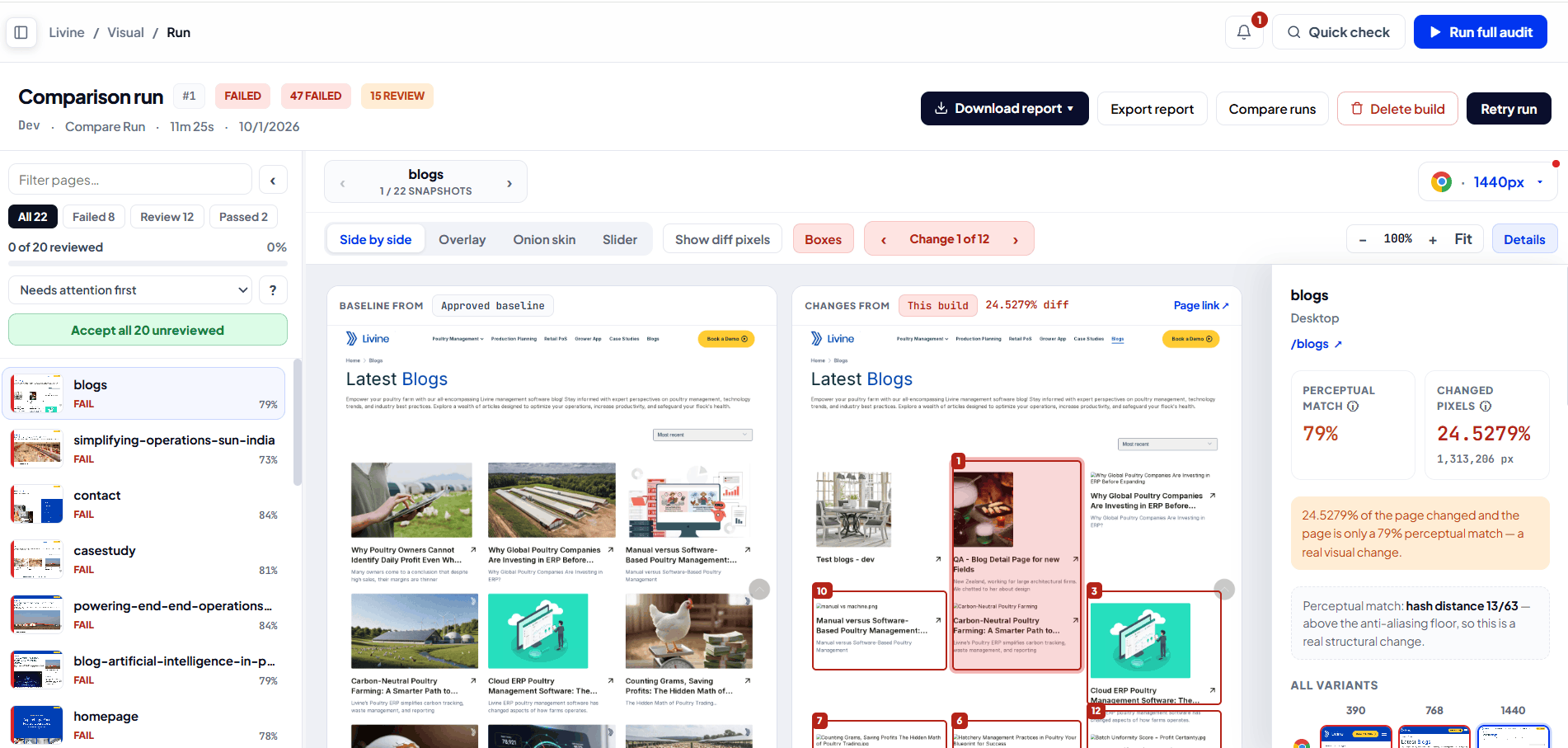
Why are the Figma links manual?
We chose manual links on purpose. In a design system, you already know which story belongs to which frame. A wrong automatic match is worse than no match at all, because it quietly compares the wrong things.
Each component can also get its own accessibility scan. That matters, because low-contrast text appeared on 83.9% of the top one million home pages in 2026 (WebAIM Million 2026). Finding a contrast problem in a button story takes minutes to fix. Finding it on a live page usually takes a ticket.
Why doesn't Truframe give a single accessibility score?
Because one number would hide the truth. Automated tools confirm some accessibility requirements and flag others, and many still need a human to judge.
Deque's study of more than 2,000 audits found automated testing fully covered about 57% of issues by volume. A single confidence score hides the rest, so Truframe doesn't lead with one.
It runs axe-core against WCAG 2.2 A and AA on the pages you choose. WCAG 2.2 was published as a W3C Recommendation on 5 October 2023, with an updated version on 12 December 2024 (W3C). Each scan is compared with a baseline, so you can see what's new.
What does the accessibility report show?
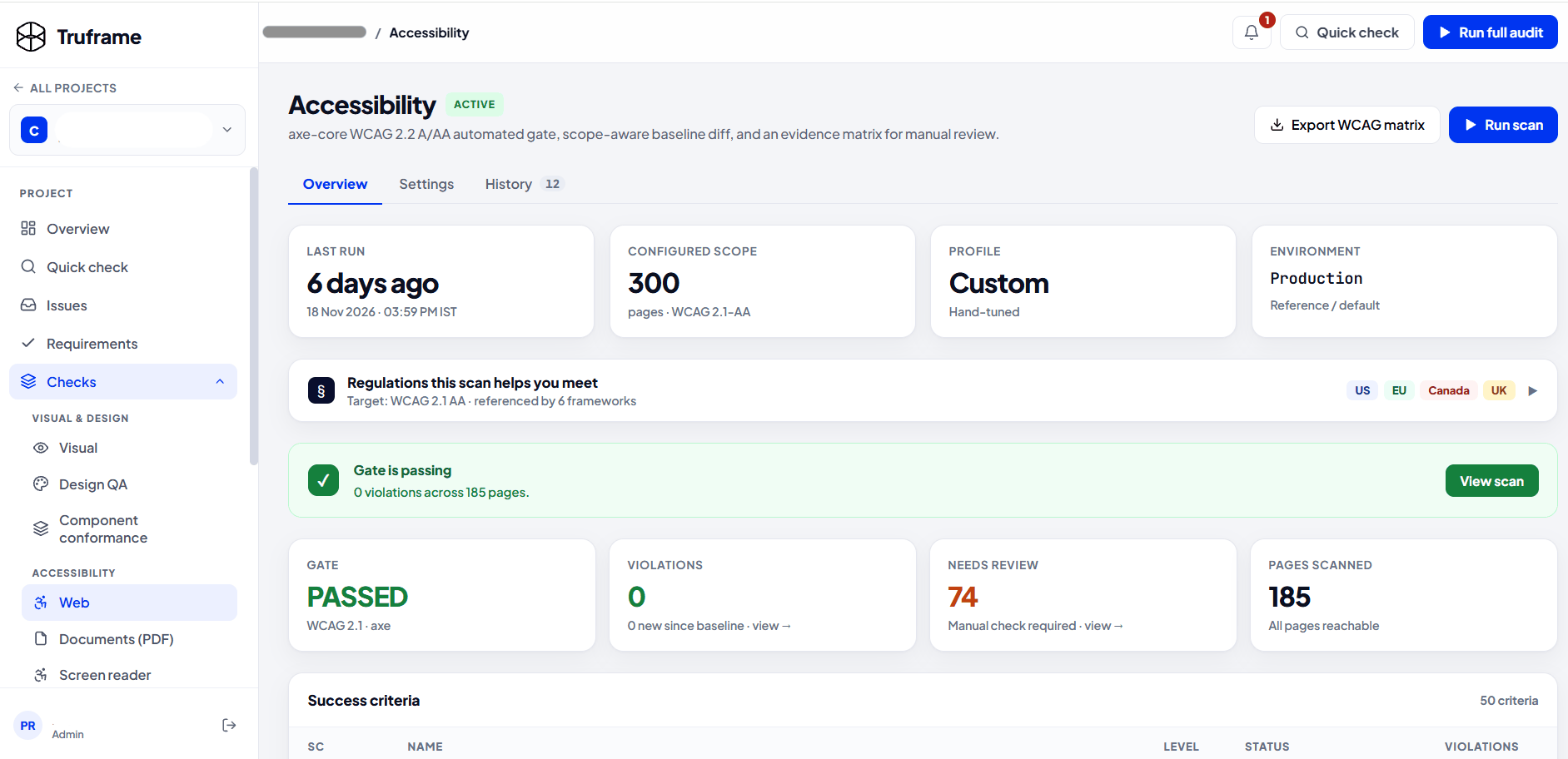
Every success criterion gets its own status, for example "Passed (automated)" or "Manual review required". Anything the scan couldn't decide is counted separately as needing review. It is never folded into a pass or a fail.
You can export the full matrix for a client or a compliance team. There's also a screen reader check for things rule-based scanning misses.
The need is real. In 2026, 95.9% of the top one million home pages had detectable WCAG 2 failures, averaging 56.1 errors per page (WebAIM Million 2026). We would rather hand a team a smaller, true picture than a bigger, flattering one.
What happens when a website blocks automated testing?
Some client sites answer automated tools with a 403 or a "Just a moment…" page, even though they open fine in a normal browser. The lazy move is to screenshot that page and mark it passed.
Truframe reports it as blocked and gives the reason. It never scans a challenge page as if it were the real site.
How do you test a site that only trusts known networks?
Truframe offers three run modes:
| Run mode | Where it runs | Browser | Best for |
| Default | The Truframe server | Playwright's headless Chromium | Sites that accept automated traffic |
| Google Chrome mode | The Truframe server | A real Chrome browser | Sites that reject the bundled browser |
| Truframe Local | A computer the site already trusts, such as an office machine | A visible Chrome window you can watch | Sites that only trust known networks |
None of them uses stealth plugins, fingerprint spoofing, CAPTCHA solving or residential proxies. It's automation, and it doesn't pretend otherwise.
Teams can also capture screenshots from their own browser or CI and upload them. Truframe then never has to reach the site at all.
Where does your data go?
Truframe is self-hosted, so screenshots and scan data sit on your own infrastructure by default. The AI vision layer is the one place that changes.
Run a local Ollama model and everything stays on your server. Choose the Claude option and the escalated screenshots, only the pages the cheaper layers couldn't settle, go to the model provider's API for a verdict. You pick which model runs, so you decide where that data goes.
How is Truframe different from other visual regression tools?
Most visual regression tools stop at a pixel diff. They tell you a region changed and leave the judgment to you. Truframe adds triage, accessibility, and design conformance on top.
| Typical visual regression tool | Truframe | |
| Visual changes | Pixel diff only; you review every flagged region | AI triage with reasons; only hard cases escalate |
| Hosting | Usually hosted SaaS | Self-hosted on your infrastructure |
| Accessibility | Separate tool, or none | WCAG 2.2 A and AA built in, manual-review items flagged |
| Figma conformance | Rarely included | Storybook stories linked to Figma frames |
| Blocked sites | Often screenshotted and passed | Reported as blocked, with run-mode options |
The trade-off is upkeep. A hosted tool runs itself. Truframe runs on your infrastructure, which keeps the data close but asks someone to look after it.
Who is Truframe built for?
Truframe suits teams that run real QA on real sites. Four groups get the most from it:
- QA engineers who want a readable verdict with a reason, not a wall of diffs.
- Developers who want the same checks running in CI through the command-line tool.
- Project managers who need one shared view of what's passing, what's flagged, and what's blocked.
- Agencies and design-system teams checking Figma-to-build conformance across many components.
The early versions assumed everyone was comfortable at a command line. That was the wrong call, so the web app now opens with a plain "Check a website" box. Paste an address, and you get a clear answer: what's wrong, what to fix first, and what wasn't checked.
What are Truframe's limits?
Truframe is a tool for a QA team. It does not replace one. A few things worth knowing before you try it:
- Manual accessibility testing still matters. Truframe tells you what it couldn't decide, but a person still has to decide it.
- AI verdicts are suggestions. The model gives a reason and a recommendation, and your team confirms or overrides it.
- Blocked sites are reported, not forced. If a site refuses automated access, you get a clear "blocked" and the run modes above.
- Truframe Local covers some scans today. On a connected computer, it handles visual testing, page discovery, SEO, broken-link, and content scans. Accessibility and site-health scans still run from the server.
- It's self-hosted. Your team runs it. That keeps data in your hands, and it means someone has to look after it.
Can you use Truframe today?
Truframe started as an internal tool, and our QA engineers use it every day. We keep sharpening it by watching how they work. We're now opening it to a handful of teams who test websites at scale. If that's you, tell us about your setup and we'll walk you through the tool to see if it fits your requirements.
Frequently Asked Questions
What is Truframe used for?
Truframe checks website quality in four areas: visual regression, design conformance against Figma, WCAG 2.2 A and AA accessibility, and site health. QA engineers, developers, and project managers see the same results in one web app. A command-line tool runs the same checks in CI.
Does Truframe let AI approve visual changes?
No. AI only weighs in on changes that clear four earlier layers: screenshots, perceptual hash, pixel diff, and rules. Claude or a local Ollama model then labels the change as noise, intended, or a likely bug, with a reason. A person on your team makes the final call and logs it in ClickUp.
Can Truframe replace manual accessibility testing?
No. Automated testing covered about 57% of accessibility issues in Deque's 2021 analysis of more than 2,000 audits. Truframe runs axe-core against WCAG 2.2 A and AA, and marks every criterion it couldn't decide as "Manual review required." The rest still needs a person, and Truframe makes that list easy to see.
What happens if a website blocks Truframe?
The report says "blocked" and gives the reason. Truframe never screenshots a 403 or challenge page and passes it off as the real site. You can rerun in Google Chrome mode, scan from a trusted computer with Truframe Local, or upload screenshots captured in your own browser or CI.
Does Truframe work with Figma and Storybook?
Yes. Truframe reads your Storybook and lists every story by component. You link each story to its Figma frame, and Truframe reports how many stories are linked, how many match, and how many drift. Links are manual by design, so it never compares a story against the wrong frame.
Is Truframe cloud-hosted or self-hosted?
Truframe is self-hosted. Your team runs it on your own infrastructure, which keeps screenshots and scan data close. The trade-off is upkeep: someone looks after the server, updates, and integrations.
Where does Truframe send my data?
By default, nowhere. Screenshots and scan results stay on your self-hosted server. The one exception is the Claude AI-vision option, which sends the escalated screenshots to the model provider's API for a verdict. Run a local Ollama model instead and everything stays on your infrastructure.
Is Truframe available to other teams, and how do I get it?
Yes. Truframe started as Specbee's internal QA tool, and we now set it up for teams who test websites at scale. Access starts with a demo: you show us your sites and testing setup, and we walk you through how Truframe would fit. Book a truframe demo and we'll take it from there.
Last updated on November 25, 2026
About the author
Siddalinga Prasanna H S
Meet Prasanna, a QA Architect at Specbee, who leads the QA Engineering pillar and is building TruFrame, Specbee’s AI-driven QA framework. He also built the drupal-qa plugin, which turns a ticket into test cases and Playwright specs. Away from work, he plays cricket and badminton and loves a long drive. London is next on his travel list. He’s a night owl, and his best ideas show up after 11 PM.

Getting started with Mintlify: The smart Documentation tool your team needs
Documentation does not have to be boring. Yes, you heard it right! Check out how Mintlify can transform the way you create and manage documentation using AI and other interactive features.
6 min read

How to Navigate Automation Testing with the Power of Selenium and Python
Want to learn the essentials of automation testing using the powerful open-source tool Selenium with Python? This article explains more.
7 min read


Working with the Devel module in Drupal 9 to Generate Dummy Content
The Devel Module in Drupal 9 comes in handy for developers with its range of submodules. In this article, we'll delve deeper into the Devel Generate module and how to work with it.
4 min read