
WordPress to Drupal Migration - When, Why & How (with a real case study)

Most teams don’t wake up one day and decide to leave WordPress.
It usually starts with small things. A feature that takes longer than it should. A plugin conflict that breaks something unexpectedly. Security and performance tweaks that feel like temporary fixes.
If you look at them individually, they aren’t deal-breakers. But over time, they start adding up.
That’s exactly where the team behind DamFailures.org found themselves.
If you’re at a crossroads, trying to decide whether it’s time to move on from WordPress, how a migration would even work, or whether it’s worth it at all, you’re in the right place.
In this blog, we’ll walk through when a move to Drupal makes sense, why teams make the switch, and how to approach the migration without unnecessary risk.
We’ll also break it down using a real example from a client we recently worked with - DamFailures.org, so you can see what this looks like in practice.
When is the right time to migrate from WordPress to Drupal?
As I mentioned previously, there’s rarely a single breaking point where you want to run away from WordPress. It’s usually a pattern.
More often than not, it is usually when seemingly manageable issues start showing up across performance, security, content management, and scalability.
1. Your site is becoming harder to maintain than to build
Does your setup rely heavily on plugins? If so, you’ve probably run into issues like updates breaking features, compatibility issues, or constant patching just to keep things running.
What this means is your system is becoming fragile.
Drupal, on the other hand, is built with a more structured, modular architecture. You’re not stitching together functionality but you’re building on a foundation designed for it.
2. Security is no longer something you’re comfortable with
WordPress can be secure, but it often depends on how well plugins and themes are maintained.
If you’re dealing with frequent vulnerabilities, outdated dependencies, or ongoing patch cycles, it’s a sign your current setup is creating risk instead of reducing it.
This is exactly what pushed the team behind DamFailures.org to reconsider their platform. Security and maintenance weren’t one-time fixes, they were ongoing concerns.
3. Your content has outgrown your structure
As your site grows, content relationships matter more.
If your team struggles to organize content, reuse it across pages, or maintain consistency, WordPress can start to feel limiting, especially when you’re relying on custom fields and plugins to simulate structure.
Drupal is built around structured content from the ground up. That shift alone can make a big difference in how scalable your content model becomes.
4. Search and discovery aren’t working well
If users can only find content when they search exact titles or if filtering feels shallow, you’re leaving a lot of value buried.
In the DamFailures.org case, search was limited to title matches, which made it difficult for users to discover relevant case studies across descriptions, tags, and metadata.
Once your content reaches a certain scale, basic search isn’t enough. You need deeper indexing, better filtering, and more control over how content is surfaced.
5. You’re planning for scale
If you’re thinking about:
- Handling larger volumes of content
- Supporting multiple user roles, languages and workflows
- Integrating with other systems (CRM, analytics, data platforms)
- Improving performance and accessibility at scale
…then you’re no longer just maintaining a website. You’re building a platform.
And that’s where Drupal tends to make more sense.
6. Your team needs more control without relying on developers
If every layout change, content update, or new page requires developer involvement, it slows everything down.
Modern Drupal changes that.
With tools like Layout Builder and Drupal Canvas, teams get a true drag-and-drop experience with structured components. This way you can create and update pages without breaking design or consistency. At the same time, Drupal AI features start assisting with content creation, recommendations, and editorial workflows, reducing manual effort without taking away control.
Why migrate from WordPress to Drupal?
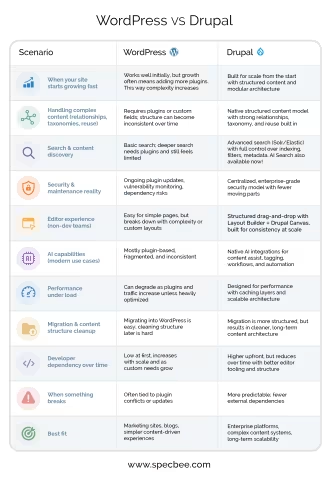
Let’s explain the reasons more simply through this use-case based comparison table of WordPress VS Drupal so you can find out where exactly you fit:
| Scenario | WordPress | Drupal |
| When your site starts growing fast | Works well initially, but growth often means adding more plugins. This way complexity increases | Built for scale from the start with structured content and modular architecture |
| Handling complex content (relationships, taxonomies, reuse) | Requires plugins or custom fields; structure can become inconsistent over time | Native structured content model with strong relationships, taxonomy, and reuse built in |
| Search & content discovery | Basic search; deeper search needs plugins and still feels limited | Advanced search (Solr/Elastic) with full control over indexing, filters, metadata. AI Search also available now! |
| Security & maintenance reality | Ongoing plugin updates, vulnerability monitoring, dependency risks | Centralized, enterprise-grade security model with fewer moving parts |
| Editor experience (non-dev teams) | Easy for simple pages, but breaks down with complexity or custom layouts | Structured drag-and-drop with Layout Builder + Drupal Canvas, built for consistency at scale |
| AI capabilities (modern use cases) | Mostly plugin-based, fragmented, and inconsistent | Native AI integrations for content assist, tagging, workflows, and automation |
| Performance under load | Can degrade as plugins and traffic increase unless heavily optimized | Designed for performance with caching layers and scalable architecture |
| Migration & content structure cleanup | Migrating into WordPress is easy; cleaning structure later is hard | Migration is more structured, but results in cleaner, long-term content architecture |
| Developer dependency over time | Low at first, increases with scale and as custom needs grow | Higher upfront, but reduces over time with better editor tooling and structure |
| When something breaks | Often tied to plugin conflicts or updates | More predictable; fewer external dependencies |
| Best fit | Marketing sites, blogs, simpler content-driven experiences | Enterprise platforms, complex content systems, long-term scalability |
Check out this article for a different take on the usual WordPress VS Drupal comparison.
Why DamFailures.org moved from WordPress to Drupal
For the team behind DamFailures.org, the decision to migrate from their WordPress site to Drupal was about fixing what wasn’t working.
- Ongoing security and maintenance concerns made their WordPress setup harder to manage over time
- Content structure issues made it difficult to organize and scale their growing library of case studies
- Limited search capabilities meant users could only find content through exact title matches
- Too much reliance on workarounds instead of having a system designed for their needs
They needed a platform that could handle complex, structured content while still being easy for non-developers to manage.
Drupal gave them that balance. With a strong architecture underneath, and a much more intuitive editing experience on top.

How to migrate from WordPress to Drupal
There’s always a layer of uncertainty about what happens to your content after a migration, your SEO performance, your existing integrations, and the workflows your team is used to?
When it comes to moving from WordPress to Drupal, those concerns are even more pronounced because the two platforms are fundamentally different in how they’re structured and managed.
But with the right approach, migration doesn’t have to be disruptive. In many cases, it becomes an opportunity to fix what wasn’t working in the first place.
Here’s a simplified step by step guide to migrate your WordPress site to Drupal:
1. Content audit and data mapping
Start by auditing your WordPress setup at a data level:
- Post types, pages, custom post types
- Taxonomies (categories, tags)
- Media structure and references
- Metadata (SEO fields, authors, dates)
Then define how each of these maps to Drupal:
- Nodes → Content types
- Categories/Tags → Taxonomies
- Custom fields → Field API (typed fields)
In the DamFailures.org migration, inconsistent media and content structures required careful normalization before mapping.
2. Content model redesign (Drupal-first, not WordPress-first)
Instead of replicating WordPress structures, design Drupal-native models:
- Define content types with field-level precision
- Normalize taxonomies for reuse and filtering
- Establish entity relationships (references, hierarchies)
- Plan URL aliases and path structures
This step is critical because Drupal’s strength comes from structured, reusable content.
3. Build the Drupal foundation
Set up Drupal with:
- Content types, fields, and vocabularies
- Entity reference relationships
- Editorial workflows and permissions
- Layout Builder / Drupal Canvas for structured page composition
Here you’re defining how content will be created, managed, and scaled.
4. Execute migration using Drupal Migrate API
Use Drupal’s migration ecosystem:
- Migrate API + Migrate Plus + Migrate Tools
- Source: WordPress database (or XML/JSON exports)
- Process plugins to transform data (formatting, mapping, cleanup)
Things to consider:
- Preserve node relationships and references
- Migrate media with proper file handling
- Retain SEO metadata and URL aliases
- Handle edge cases with custom migration plugins
For DamFailures.org, large volumes of loosely structured content required custom transformations during migration.
5. Search, indexing, and discoverability
Post-migration, configure search properly:
- Integrate Apache Solr, Elasticsearch or AI Search like TruSearch
- Index multiple fields (titles, body, metadata, taxonomy terms)
- Enable faceted search and filtering
This solves a major limitation seen in WordPress setups, where search is often shallow or plugin-dependent.
6. Performance, accessibility, and infrastructure
Drupal allows deeper control at this layer:
- Configure caching (Dynamic Page Cache, BigPipe)
- Optimize media (responsive images, lazy loading)
- Ensure WCAG accessibility compliance
- Deploy on scalable infrastructure (e.g., AWS)
In the DamFailures.org project, this contributed to a performance jump from 52 to 98.
7. QA, redirects, and deployment
Before launch:
- Validate migrated data integrity
- Set up 301 redirects to preserve SEO equity
- Test editorial workflows and permissions
- Run performance and accessibility audits
Automated CI/CD pipelines can help streamline deployment and reduce errors.
Case Study Snapshot: DamFailures.org
Context
An initiative by Association of State Dam Safety Officials, serving engineers, regulators, and researchers with critical dam safety knowledge.
The problem
- Content structure was inconsistent
- Search was limited to title matches
- Security and maintenance were ongoing concerns
The approach
- Rebuilt content using Drupal’s structured model (entities + taxonomies)
- Migrated content with custom mapping and cleanup
- Enabled advanced search with deeper indexing and filtering
- Introduced flexible editing with Layout Builder
The outcome
- Performance improved from 52 → 98
- Faster, more accurate content discovery
- Easier content management for non-developers
- A scalable, secure platform built for growth
Final thoughts
The WordPress vs Drupal decision is (and should) be about choosing a platform that matches where you’re headed.
If your site is staying simple, WordPress will continue to do the job. But if you’re dealing with growing content, multiple stakeholders, deeper integrations, or higher expectations around performance and discoverability, Drupal is your best bet.
The teams that migrate from WordPress to Drupal usually make the shift when they start seeing patterns, not problems.
That’s exactly what happened with DamFailures.org. The move to Drupal wasn’t reactive. It was a step toward a platform that could support how their content, users, and expectations were evolving.
So, don’t migrate because something broke. Migrate because you want to build something that needs to last. When you’re ready to explore what that could look like, it helps to work with a team that’s done it before, end to end. Let’s talk today or you could even find out more details on how we can help with your WordPress to Drupal migration.
Last updated on July 31, 2026
About the author
Shefali Shetty
Meet Shefali Shetty, Director of Marketing at Specbee. An enthusiast for Drupal, she enjoys exploring and writing about the powerhouse. While not working or actively contributing back to the Drupal project, you can find her watching YouTube videos trying to learn to play the Ukulele.

What happens after a CMS Migration? A guide to post-migration Drupal Support
Curious about what makes a CMS migration successful? No, it isn’t limited to the transition. Read this blog to learn about ongoing support post-migration.
7 min read

CMS Integrations: All the questions you’ve been wanting to ask
Marketers feel the pain of inefficient CMS integrations more than anyone. Agree? We’ve answered some of the most popular questions about CMS integrations and even given you the clarity you need to get your systems talking. Check it out!
9 min read

15 Drupal Terms Decoded
Ever find yourself scratching your head trying to figure out terms while skimming through Drupal-centric blogs? Read this blog to learn about 15 such Drupal terms, concepts, and tools.
11 min read