
Getting started with Drupal Canvas: A frontend developer's first look

If you've spent any time in the Drupal world over the last year, you've probably heard people talking about Drupal Canvas like it has reinvented page building altogether. We already have Layout Builder, and it works. Editors know it. So, just like you, I wondered too - why do we need another page builder for Drupal?
Then I worked on a project where we built production pages on Canvas, and I get it now. It's a genuinely different way of thinking about how content, components, and code fit together in Drupal, and it's clearly where the project is heading (Canvas is set to become part of the default Drupal CMS experience).
While some of my Canvas time has been client work, recently most of it has been the issue queue. I contribute to the Drupal AI Initiative that Specbee sponsors, and Canvas feature tickets kept landing in front of me while I was there. Seeing the same thing from both sides changes how you read it. On a project, you learn what Canvas does. In an issue, you learn why it does it that way.
So I wanted to write down what I learned getting it running, in the order I actually learned it, mistakes and all.
Key Takeaways
- Drupal Canvas is Drupal's component-driven visual page builder. It shipped as the default builder in Drupal CMS 2.0 on January 28, 2026.
- It builds on Single Directory Components (SDC), so a theme that already uses SDCs has most of the "exposure" work done already.
- You need Drupal core 11.3 or later, Composer 2.7 or later, and admin access to install it.
- Canvas includes a built-in Code Component editor. You write real JSX and Tailwind CSS in the browser and see it render live, with no local build step.
- If drupal/core-dev is in your composer.json, install Canvas with the -W flag to avoid a dependency conflict.
Why not just stick with Layout Builder?
That was my first question too, and it deserves an honest answer before you install anything. Layout Builder is genuinely solid at arranging blocks and fields into page sections. Editors already know how to use it.
The limits show up once you need something custom. Building a new, interactive, front-end-driven component usually means a developer writing a block plugin or a custom block entity, then looping the editor back in days later. The editing experience is form-heavy too, and it never quite matches what the live page looks like.
Canvas solves the same problem from the opposite direction. Instead of pre-approved blocks, you get a live, drag-and-drop canvas that renders your design system.
Canvas components are first-class, prop-driven building blocks rather than block plugins. That one shift is what makes the rest possible:
- True WYSIWYG editing. What you see while dragging things around is what visitors get. Canvas renders your real theme, real CSS, real components.
- Component-driven architecture. Built on Single Directory Components (SDC), so the same definitions that power your theme power your page builder.
- In-browser code authoring. You can write React (JSX) and Tailwind components inside Canvas without a local build step. They become drag-and-droppable like any other component.
- Editor-grade controls. Undo history, live multi-page preview, and in-place editing that feels closer to Figma or Webflow than to a Drupal admin form.
What do you need before installing Drupal Canvas?
Sort these out before you touch Composer. Canvas currently needs Drupal core 11.3 or later, since it depends on recent Single Directory Components and JSON:API work in core (per the module's current requirements on Drupal.org). That constraint has moved with past releases, so check the project page before you pin a version in a live build.
You'll also need Composer 2.7 or later, plus admin access to install modules and change permissions. One requirement matters more than the others: a theme built around Single Directory Components, or a willingness to build one. Canvas can technically run without SDCs, but its component library has nothing to show you until you have some.
How do you install and enable Drupal Canvas?
Canvas ships as a contributed module. It was called Experience Builder during early development, and the project renamed it to Canvas after a trademark conflict, so you'll still see the old name in older issue queues and talks. Here’s how you get started with it:
- Install the module with Composer: composer require drupal/canvas
- If your project also has drupal/core-dev installed, resolve the dependency conflict Drupal.org tracks in issue #3534774 by letting Composer resolve both packages together: composer require drupal/canvas drupal/core-dev -W
Enable the module with Drush, or from the Extend UI: drush pm:enable canvas -y
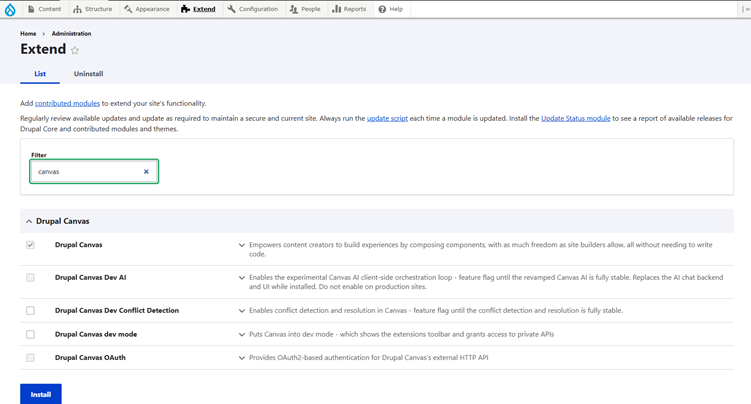
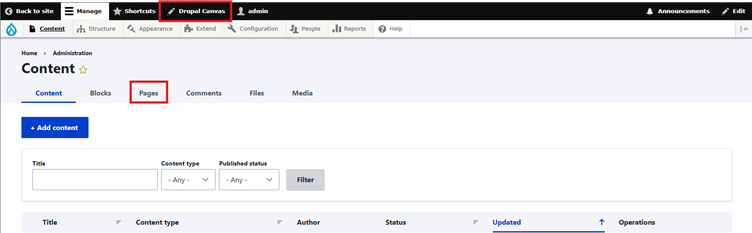
- Confirm it's active. A Pages tab appears under Content, listing pages built with Canvas separately from your regular content, and a /canvas route holds the builder interface itself.
What does the Canvas interface look like?
Grant yourself the relevant Canvas permissions first. There's a dedicated permission set worth reviewing, since you probably don't want every authenticated user building pages. Then open the builder from Content → Pages, or go straight to Drupal Canvas from the top bar.
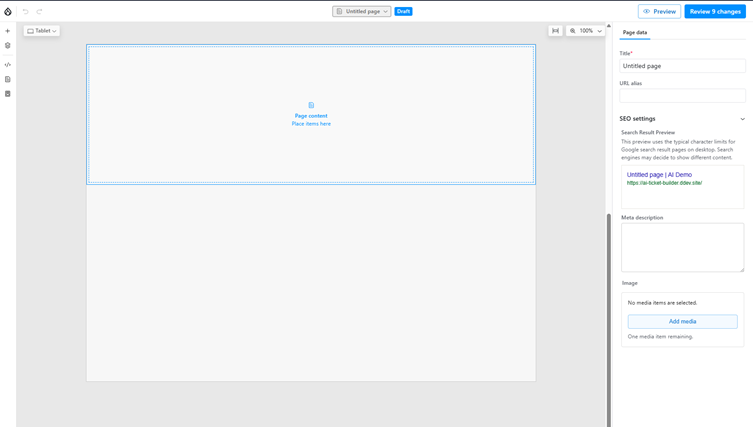
The interface splits into four zones, and it clicks fast once you've dragged your first component. The left sidebar is home base: component library, layers view, pages list, and saved templates.
What does the Canvas Top Bar contain?
The top bar handles page navigation, zoom, and device preview toggles so you can check mobile and tablet without leaving the builder, plus the save controls for the page you're working on.
How does the Layers panel work?
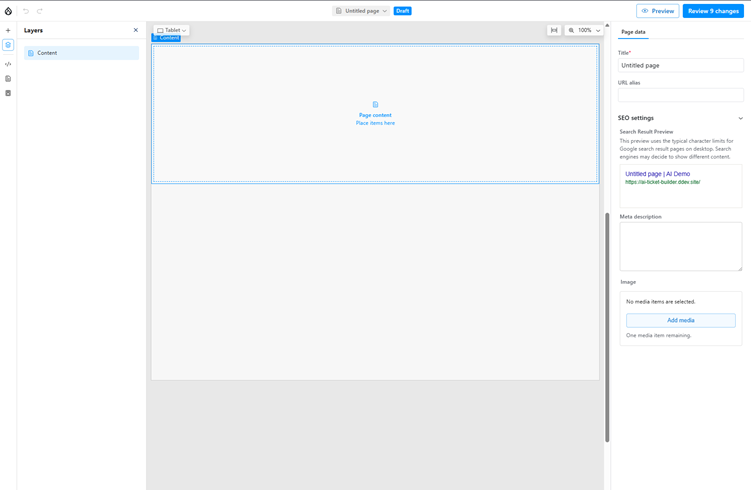
The Layers panel, in that left sidebar, is the part I use most once a page has more than a handful of components. It shows a hierarchical tree of everything on the page: every section, every nested component, every filled slot. Once a card component holds an icon holding a button, clicking the exact nested piece directly on the canvas gets fiddly fast.
The Layers panel gives you a plain outline view instead. Click a layer to select that exact component rather than whatever's visually on top of it, drag entries to reorder or reparent them, and get a quick read on how deep your composition goes. If you've used Figma's layers panel or a browser's DOM tree, it's the same mental model applied to a Drupal page.
What does the Center Canvas Show?
The center canvas is the live preview of the page, rendered with your actual theme rather than an approximation. It's also where you drag and drop components into place.
How does the Canvas Right Properties Pane work?
The right pane shows properties for whatever's currently selected, whether that's component props, page-level data, or general configuration. To place something, you drag a component from the library on the left, drop it on the canvas, then fill in its props on the right.
How do you get your Components to show up in Canvas?
This is where existing SDC work pays off. Canvas doesn't invent a new component format. It discovers Single Directory Components the same way Drupal core does, so a theme that already has SDCs has done most of the exposure work already.
A few things still decide whether a component shows up cleanly. Give every prop a proper schema and examples: Canvas reads your .component.yml prop definitions to generate the editing widgets in the right panel, so a string prop becomes a text field and an integer becomes a number field. Vague YAML produces a vague widget.
Define slots deliberately if you want a component to accept nested content, like a card that holds any combination of other components. Without a slots definition, the component is a dead end in the layout tree. Use Canvas's built-in image component for image props too, rather than a raw string or URL field, so Canvas can hook into the media library instead of asking editors to paste file paths.
If you're unsure how to define a prop type, Canvas's test module ships an SDC called sdc_test_all_props. Its all-props.component.yml declares one prop for every type Canvas supports, which is faster to check than reverse-engineering it from the docs. Canvas and Drupal core's SDC system only require a .component.yml and a .twig file to discover and render a component; CSS and JS are optional, needed only for scoped styling or behavior.
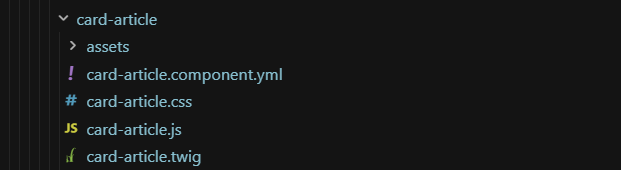
A well-formed SDC just appears in the component library. There's no separate publish step. Canvas also groups components by type: Block Components (your existing blocks and views), Pattern Components (saved arrangements you can reuse across pages), and Code Components, the React-based ones.
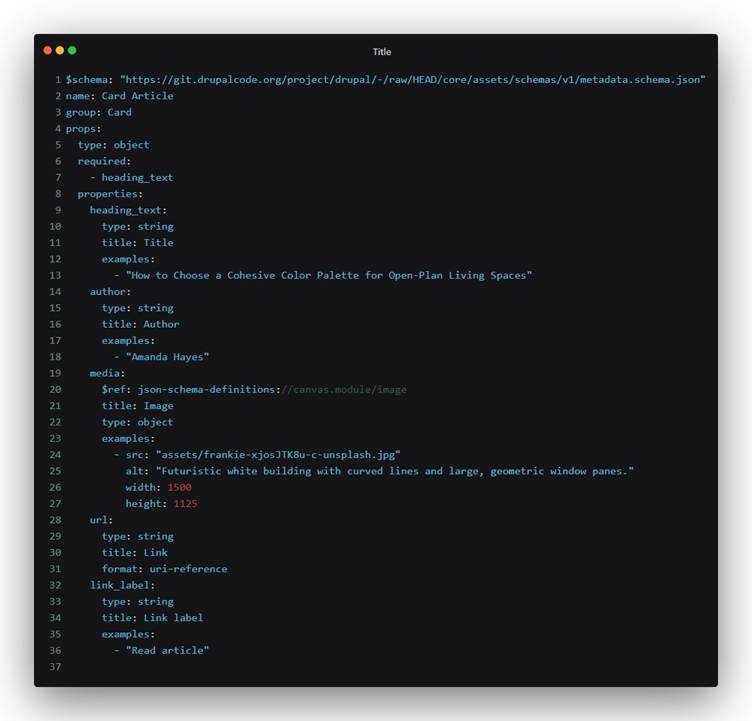
Take a Card Article component with heading_text, author, media, url, and link_label props. Marking heading_text as required in the schema, and pointing media at Canvas's built-in image schema ($ref: json-schema-definitions://canvas.module/image) instead of a plain string, is what turns a text box into a real media picker. Setting url to format: uri-reference tells Canvas to validate it as a link instead of free text.
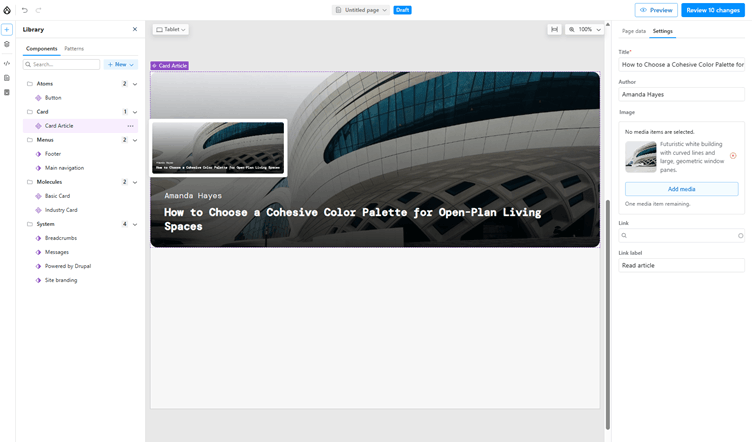
The mapping is direct once you see it. heading_text and author are both type: string, so they become plain text fields, and adding an examples value shows that placeholder text as a hint instead of an empty box. None of these widgets need custom code. Canvas reads the schema and generates the control for the job.
Can you build a custom React Component inside Canvas?
This is the feature that changes who can contribute interactivity to a page. Canvas ships with a built-in Code Component editor, and it renders components using Preact with React compatibility enabled. If you know React, you already know how to write these.
Here's the flow:
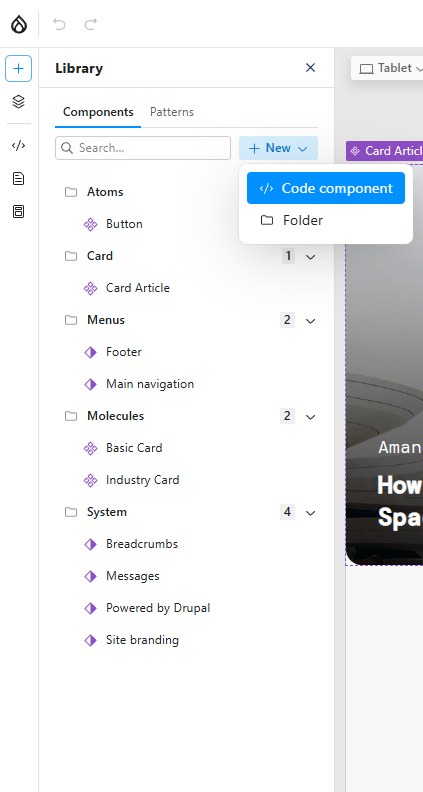
- In the left sidebar, open Manage Library, then the Code tab.
- Choose Code Component to create a new one.
- You'll land in a split editor: the left panel is where you write your JSX and CSS (Tailwind classes work out of the box, so you can style without leaving the component), the right panel shows a live preview that updates as you type, and a bottom section is where you define the component's data, its props, and slots the same way you would for an SDC.
Write your component. A simple one might look something like this:
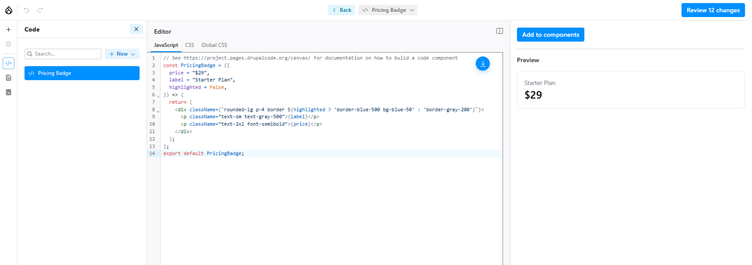
- Watch the live preview update, adjust props until it behaves the way you want, then click Add to components in the right panel.
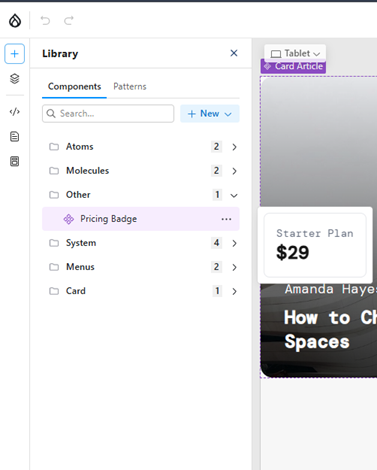
From that point on, your component sits in the library right alongside your Twig-based SDCs and Drupal blocks, ready to be dragged onto any page. Editors don't know or care that one component is Twig and another is JavaScript. They just see a component with props to fill in.
Is Drupal Canvas worth adopting now?
Canvas already ships as the default page builder in Drupal CMS 2.0, released January 28, 2026, so this isn't an experimental side project anymore. Writing JSX, seeing it render live, and handing it to a content editor without a deploy cycle is a different workflow than Drupal has offered before. If you're a frontend-leaning Drupal developer like me, Canvas is worth carving out a weekend for.
Drupal.org's usage statistics show Canvas installed on 8,315 reporting sites as of September 6, 2026, a few months after it became Drupal CMS 2.0's default builder. That count includes only sites reporting through Drupal's Update Status module, so real-world adoption is higher. Early, but real.
Layout Builder still works fine for simpler sites with editors who already know it. Canvas is where the ambition sits right now, and getting hands-on with it early pays off.
Frequently Asked Questions
What Drupal core version do I need to run Drupal Canvas?
Canvas currently requires Drupal core 11.3 or later, per the module's requirements on Drupal.org. It won't install on Drupal 10. Because that constraint has moved with past releases, check the project page before pinning a version in a live build.
Is Drupal Canvas the same thing as Experience Builder?
Yes. Canvas launched under the name Experience Builder during early development, and the project renamed it to Canvas over a trademark conflict. You'll still find the old name in issue queues, session recordings, and blog posts from before the rename. The module and functionality are the same.
Does Drupal Canvas replace Layout Builder?
No. Canvas ships as Drupal CMS 2.0's default visual builder as of January 28, 2026, while Layout Builder remains available for block-based section building. Teams reach for Canvas when they want a shared visual workspace across design, content, and code, and for Layout Builder when a simpler block arrangement is enough.
What do I need before installing Drupal Canvas?
You need Drupal core 11.3 or later, Composer 2.7 or later, and admin access to install modules and change permissions. In practice, a theme built on Single Directory Components matters most, since Canvas's component library has nothing to show without SDCs in place. Budget time to build a few first if your theme doesn't have any yet.
Can I write React components inside Drupal Canvas?
Yes. Canvas includes a built-in Code Component editor that renders JSX using Preact with React compatibility, directly in the browser, with no local build step. You write JSX and Tailwind CSS in a split editor, watch a live preview update, then add the finished component to the library. It then sits alongside your Twig-based SDCs, ready to drag onto any page.
Why isn't my SDC showing up in the Canvas component library?
The most common cause is a missing or incomplete .component.yml file. Canvas only needs a .component.yml and a .twig file to discover and render a component, so check the YAML for valid prop schemas first. A missing slots definition is the second most common cause, if you expected the component to accept nested content.
How much rework does an existing SDC-based theme need for Canvas?
Often very little, since Canvas discovers Single Directory Components the same way Drupal core does. The usual gaps are prop schemas without examples, image props using a raw string instead of Canvas's built-in image schema, and components missing a slots definition. Check sdc_test_all_props in Canvas's test module if you're unsure how a prop type should be declared.
Sources:
Drupal Canvas is Now Available (Drupal.org)
Drupal Canvas project page (Drupal.org)
What is Drupal Canvas & why it matters (Agiledrop)
Drupal CMS 2.0 released (Dries Buytaert)
Cannot be installed if drupal/core-dev is installed, issue #3534774 (Drupal.org)
Last updated on September 15, 2026
About the author
Shashank Rai
Meet Shashank Rai, a Frontend Developer at Specbee, whom you'll mostly find at home in the space between Drupal components and clean UI. Off the clock, he's swimming laps, dreaming about the northern lights in Norway (Iceland's next on the list), or several hours into a video game he'll swear he's about to quit. Shashank once competed in a district-level Abacus competition, so don't challenge him to mental math. His one true nemesis: slow walkers.


How we patched 30+ enterprise client sites for a Critical PHP Vulnerability within 24 Hours (and what we found when we looked back)
Everyone’s talking about the 9.2 PHP vulnerability that dropped on a Wednesday evening. We patched 30+ Drupal sites in 24 hours with zero downtime. Here’s what our audit found next.
5 min read

Why (and how) government agencies should migrate from DNN to Drupal
Planning a DNN to Drupal migration? See how Drupal helps government agencies meet WCAG 2.1 AA, Section 508, and ADA Title II rules with stronger web governance.
8 min read

How to display image galleries with thumbnail navigation in Drupal
Need better image galleries in Drupal? The Media Scroller module adds a large main image, synced thumbnail navigation, and simple configuration without custom templates.
11 min read