
How to Adhere to Drupal Coding Standards with Git Hooks

Good code is like well-built Lego creations - it's strong, looks good, and is easy to change if you need to. The importance of good coding standards is especially high when you're coding in a team, working on a scalable project, or participating in an open-source community like Drupal.
As with any other open-source project, Drupal has thousands of developers working on the project. And each of them comes with their own level of expertise. How do you ensure everyone on your team or in the community follows good coding practices? Git Hooks!
Git Hooks are an easy and automated way of ensuring your code always meets Drupal’s coding standards. Implementing Drupal Coding Standards with Git hook will help developers to commit and push the code with proper coding standards as declared by the Drupal community. It can also help improve your project management skills and allows developers to commit code with proper commit message standards. Learn more about Git hooks and how to put them into action.
What is a Git Hook
Git Hooks are scripts that will run automatically every time a Git command is invoked. Just as you would use hook_form_alter to alter the forms in Drupal, you can have separate pre-defined hooks for every Git action.
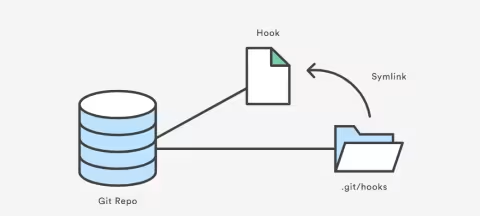
The Pictorial Representation of Git hook
Finding Git hooks
You can find Git hooks within your project folder (provided Git is initialized) under .git/hooks. There, you will find all the hooks with .sample extension to prevent them from executing by default.
To make use of the required hooks, you need to remove the .sample extension and edit your code for the execution.
There are many Git hooks available but we are going to use pre-commit Git hooks for initiating Drupal coding standards.
Pre-commit Git hooks are hooks that will run before the code gets committed. It checks for the line of code that's getting committed.
Implementing Git Hooks
Before you start, make sure you have these basic requirements ready:
- Composer
- Git
- Php-code-sniffer
- drupal/coder:8.3.13
The below procedure is for installing it in Mac devices. You can find the reference link here for installing instructions on other devices.
- brew install php-code-sniffer
- composer global require drupal/coder:8.3.13
- phpcs --config-set installed_paths ~/.composer/vendor/drupal/coder/coder_sniffer
- phpcs -i → Will give you installed coding standards.
Let's begin!
I am creating a new Drupal project called demo. You can use it in your existing project as well.
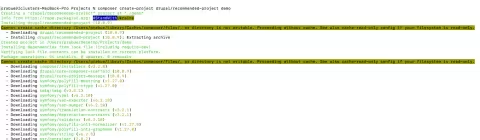
→ Using cd command we got into the project folder.
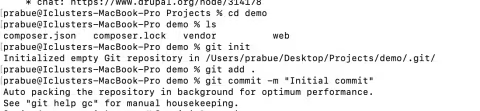
cd demo
→ initializing git into the project
Git init
→ Adding and making my first commit.
git commit -m “Initial commit”
→ Installing php code sniffer using below command for Mac.
brew install php-code-sniffe

→ Installing Drupal coder using composer
composer global require drupal/coder:8.3.13
→ Once the coder and its path are defined you will get the following output as shown below image.
phpcs --config-set installed_paths ~/.composer/vendor/drupal/coder/coder_sniffer
→ phpcs -i
The above command will give you Drupal and DrupalPractice

→ Now you can commit your code. If you have any syntax or coding standard error, you will be notified in the display and your commit process will be aborted.
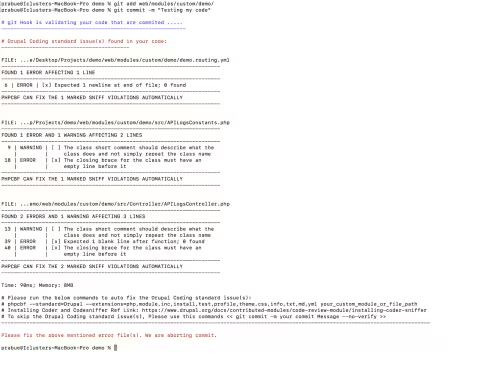
→ Below is the code to fix the error automatically
phpcbf --standard=Drupal --extensions=php,module,inc,install,test,profile,theme,css,info,txt,md,yml web/modules/custom/demo
Any other issues will need to be fixed manually. Commit your code once done.

Once your code is clean it will allow you to commit the code
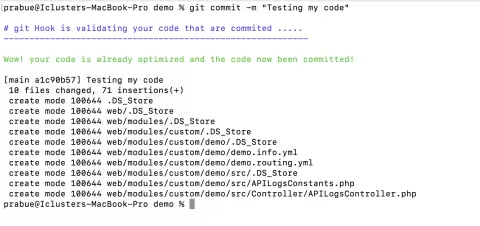
Just copy and paste the code in pre-commit.sample within .git/hooks. Don’t forget to remove sample extensions.
Pre-commit code sample:
#!/bin/bash

# Redirect output to stderr.
exec 1>&2

# Color codes for the error message.
redclr=`tput setaf 1`
greenclr=`tput setaf 2`
blueclr=`tput setaf 4`
reset=`tput sgr0`

# Printing the notification in the display screen.
echo  "${blueclr}"
echo "................................. Validating your codes  ……..…………....."
echo "-----------------------------------------------------------${reset}"

# Mentioning the directories which should be excluded.
dir_exclude='\/kint\/|\/contrib\/|\/devel\/|\/libraries\/|\/vendor\/|\.info$|\.png$|\.gif$|\.jpg$|\.ico$|\.patch$|\.htaccess$|\.sh$|\.ttf$|\.woff$|\.eot$|\.svg$'

# Checking for the debugging keyword in the commiting code base.
keywords=(ddebug_backtrace debug_backtrace dpm print_r var_dump  dump console\.log)

keywords_for_grep=$(printf "|%s" "${keywords[@]}")
keywords_for_grep=${keywords_for_grep:1}

# Flags for the counter.
synatx_error_found=0
debugging_function_found=0
merge_conflict=0
coding_standard_error=0


# Checking for PHP syntax errors.
changed_files=`git diff-index --diff-filter=ACMRT --cached --name-only HEAD -- | egrep '\.theme$|\.module$|\.inc|\.php$'`
if [ -n "$changed_files" ]
then
 for FILE in $changed_files; do
 php -l $FILE > /dev/null 2>&1
 compiler_result=$?
 if [ $compiler_result -eq 255 ]
 then
   if [ $synatx_error_found -eq 0 ]
   then
     echo "${redclr}"
     echo "# Compilation error(s):"
     echo "=========================${reset}"
   fi
   synatx_error_found=1
   `php -l $FILE > /dev/null`
 fi
 done
fi

# Checking for debugging functions.
files_changed=`git diff-index --diff-filter=ACMRT --cached --name-only HEAD -- | egrep -v $dir_exclude`
if [ -n "$files_changed" ]
then
 for FILE in $files_changed ; do
   for keyword in "${keywords[@]}" ; do

     pattern="^\+(.*)?$keyword(.*)?"
     resulted_files=`git diff --cached $FILE | egrep -x "$pattern"`
     if [ ! -z "$resulted_files" ]
     then
       if [ $debugging_function_found -eq 0 ]
       then
         echo "${redclr}"
         echo "Validating keywords"
         echo "================================================${reset}"
       fi
       debugging_function_found=1
       echo "Debugging function" $keyword
       git grep -n $keyword $FILE | awk '{split($0,a,":");
         printf "\found in " a[1] " in line " a[2] "\n";
       }'
     fi
   done
 done
fi

# Checking for Drupal coding standards
changed_files=`git diff-index --diff-filter=ACMRT --cached --name-only HEAD -- | egrep -v $dir_exclude | egrep '\.php$|\.module$|\.inc$|\.install$|\.test$|\.profile$|\.theme$|\.js$|\.css$|\.info$|\.txt$|\.yml$'`
if [ -n "$changed_files" ]
then
   phpcs_result=`phpcs --standard=Drupal --extensions=php,module,inc,install,test,profile,theme,css,info,txt,md,yml --report=csv $changed_files`
 if [ "$phpcs_result" != "File,Line,Column,Type,Message,Source,Severity,Fixable" ]
 then
   echo "${redclr}"
   echo "# Hey Buddy, The hook found some issue(s)."
   echo "---------------------------------------------------------------------------------------------${reset}"
   phpcs --standard=Drupal --extensions=php,module,inc,install,test,profile,theme,css,info,txt,md,yml $changed_files
   echo "<=======> Run below command to fix the issue(s)"
   echo "# phpcbf --standard=Drupal --extensions=php,module,inc,install,test,profile,theme,css,info,txt,md,yml your_custom_module_or_file_path"
   echo “<====================================================>"
   echo "# To skip the Drupal Coding standard issue(s), Please use this commands << git commit -m your commit Message --no-verify >>"
   echo "-----------------------------------------------------------------------------------------------------------------------------------------${reset}"
   coding_standard_error=1
 fi
fi

# Checking for merge conflict markers.
files_changed=`git diff-index --diff-filter=ACMRT --cached --name-only HEAD --`
if [ -n "$files_changed" ]
then
 for FILE in $files_changed; do

   pattern="(<<<<|====|>>>>)+.*(\n)?"
   resulted_files=`egrep -in "$pattern" $FILE`
   if [ ! -z "$resulted_files" ]
   then
     if [ $merge_conflict -eq 0 ]
     then
       echo "${redclr}"
       echo "-----------------------Unable to commit the file(s):------------------------"
       echo "-----------------------------------${reset}"
     fi
     merge_conflict=1
     echo $FILE
   fi
 done
fi

# Printing final result
errors_found=$((synatx_error_found+debugging_function_found+merge_conflict+coding_standard_error))
if [ $errors_found -eq 0 ]
then
 echo "${greenclr}"
 echo "Wow! It is clean code"
 echo "${reset}"
else
 echo "${redclr}"
 echo "Please Correct the errors mentioned above. We are aborting your commit."
 echo "${reset}"
 exit 1
fi
Final Thoughts
I hope you found this article interesting and that it helps you write better code because better code means a better web! Liked what you just read? Consider subscribing to our weekly newsletter and get tech insights like this one delivered to your inbox!
Last updated on July 31, 2026
About the author
E. Prabu
Meet E. Prabu, Drupal Developer, and a State Level Handball Player. He fancies a vacation amidst the hills of Kashmir and enjoys the company of the street dogs around his house. While Prabu loves to remain busy with his code during work hours, you’ll find him binge-playing outdoor games whenever he can. If you want to play a game of handball, you know whom NOT to challenge!
An Introduction to Design Patterns in PHP (and leveraging it in Drupal)
PHP Design patterns is an Object-oriented programming (OOP) concept that is also implemented in Drupal 10 projects. Learn more about design patterns in PHP and how to leverage it in Drupal.
12 min read

Functions and filters to get you started with Twig Tweak in Drupal 10 (with examples)
The Twig tweak module in Drupal 10 is extremely beneficial for developers when working with twig templates. Find code snippets along with examples to implement Twig tweak in Drupal 10.
13 min read
How to split configurations across different sites in Drupal 10
Want to deploy only a subset of your configuration instead of exporting the entire configuration while moving to different environments in Drupal 10? Learn how to split configurations with the Drupal Configuration Split module.
4 min read