
Implementation of get direction in Drupal (Map route directions)
The Get Directions module provides the ability to get directions to and from places using Google Maps.
Implementing get direction for a Drupal website will help you give a route map to your required area after user enters from and to addresses. Or you can make to address constant.
In-order to implement get-direction functionality following modules are required.
- Get direction
- GMap
- Geofield
- Geophp
- Chaos tools
- Address field
A.Download install and enable the above modules.

B. Now create a custom content type with address field with field type as geofield and widget type as latitude/longitude.
For ex: get_direction_type
C. Create a content for the above content type and note the node id.
For ex: mysite_get_direction
D. Next step will be to create a custom block and paste the following code into block body.
<?php
$n = arg(0);
if ($n == 'node') {
$nid = arg(1);
if (is_numeric ($nid) && $nid > 0) {
echo getdirections_entity_setlocation($n, 'to', 134);
}
}
?>
In the above code, 134 is the node id of the content we created. In this ex: mysite_get_direction
Save the block and enable it to the pages you want to display.
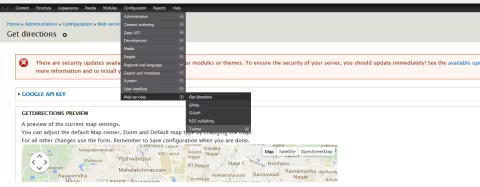
E. Now navigate to admin menu - Configuration > web services > get direction.
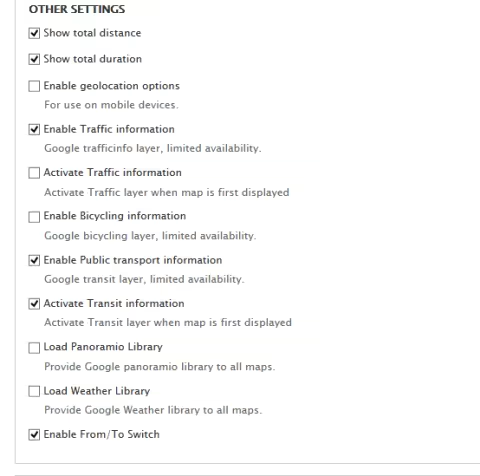
Most of the settings are simple and self explainatory.
Some settings i would like to highlight is
Other settings tab
- You can enable to display total distance and duration of the travel.
- Make the to address constant- Enable from/To switch.
- Enable traffic information for more accurate results.
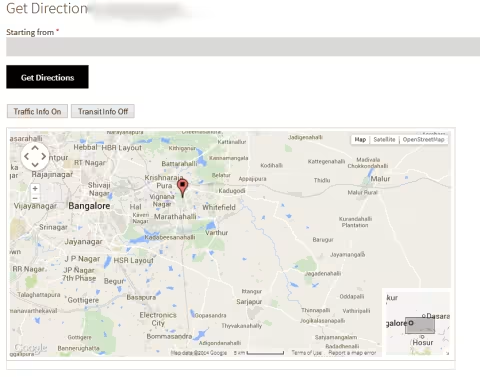
Your final result will look similar to below image.
Getdirections also supports the following locative modules:
- Getlocations_fields
- Location
- Geofield
- Geolocation
You should only install one of the above.
Last updated on July 31, 2026


How we patched 30+ enterprise client sites for a Critical PHP Vulnerability within 24 Hours (and what we found when we looked back)
Everyone’s talking about the 9.2 PHP vulnerability that dropped on a Wednesday evening. We patched 30+ Drupal sites in 24 hours with zero downtime. Here’s what our audit found next.
5 min read

Why (and how) government agencies should migrate from DNN to Drupal
Planning a DNN to Drupal migration? See how Drupal helps government agencies meet WCAG 2.1 AA, Section 508, and ADA Title II rules with stronger web governance.
8 min read


How to display image galleries with thumbnail navigation in Drupal
Need better image galleries in Drupal? The Media Scroller module adds a large main image, synced thumbnail navigation, and simple configuration without custom templates.
11 min read